Switch scanning
For children who use a switch instead of pointing. A highlight moves across the screen and the child selects with the switch.
- 1
Parent area → Speech & display → Access → Switch scanning.
- 2
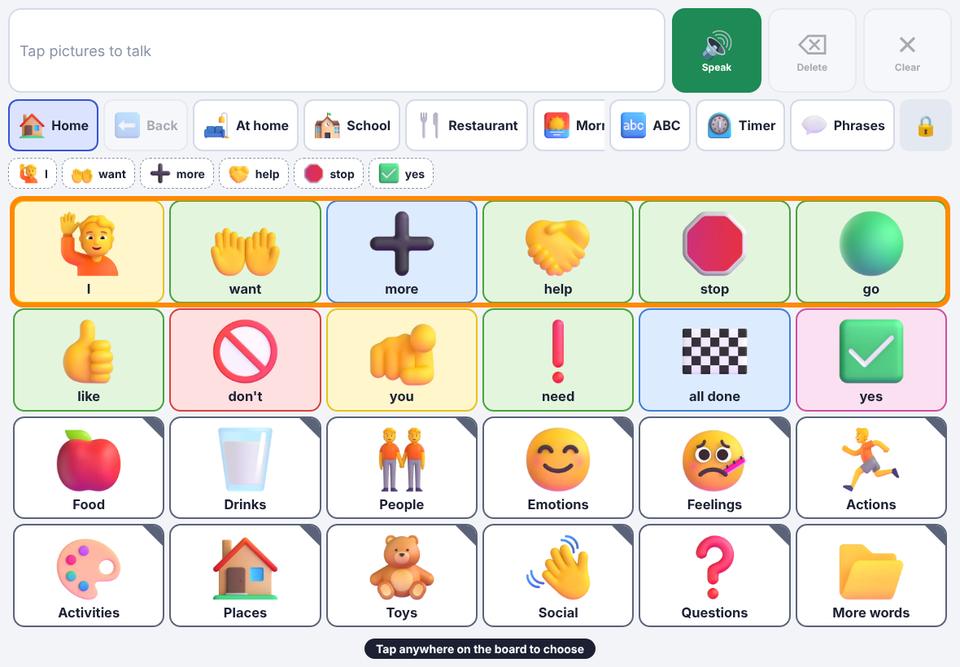
Automatic (1 switch): an orange highlight moves by itself, first through rows, then across the chosen row. A tap anywhere on the board, the Space key, or a Bluetooth switch selects.
- 3
Step (2 switches): the left half of the board (or Space) moves the highlight; the right half (or Enter) selects.
- 4
Set Scan speed, and turn on Say each highlighted item for auditory scanning.
Most Bluetooth switch interfaces act like a keyboard: set them to send Space and Enter.
To get to the parent area, press and hold 🔒 as usual.